A user reported that all of their Windows Desktop icons and shortcuts were missing on their Windows XP Service Pack 3 computer. It was immediately assumed they had been bit with Malware, and they had. Ran several scans with various packages to clean up this PC, but still the Desktop Icons were missing.
Then discovered that restoring these Desktop Icons and Desktop Shortcuts was super easy because hiding them, as it turns out, is an "option" in Windows.
So it was simply a matter of right-clicking on the Desktop, choosing Arrange Icons By, and clicking Show Desktop Icons.
It's unclear if the malware turned off the icons or if the user did it by accident.
Thanks to this MS article for helping solve this:
http://support.microsoft.com/kb/330170
Wednesday, September 11, 2013

Sunday, September 8, 2013
Unable to re-join a computer to a Windows Domain
Last week a co-worker had an interesting (this means frustrating) problem. The hard drive in a Windows XP SP3 desktop computer was bad. He replaced it and then restored the backup image using Symantec System Recovery.
Unfortunately it wouldn't let him login to the Active Directory domain after the restore. We have run into this before and in the past we simply login to the PC as a local administrator, un-join the computer from the domain and then re-join it to the domain.
This time, however, when he un-joined from the domain, it didn't really do it. The computer was still listed in Active Directory. So he manually deleted it from Active Directory.
When he went to re-join the computer to the domain, he kept getting this message:
"Multiple connections to a server or shared resource by the same user, using more than one user name, are not allowed. Disconnect all previous connections to the server or shared resource and try again."
We repeatedly used this command to see if there were any active connections:
And then this command to delete all connections (even though there were none listed):
We ultimately figured out the issue was previously mapped network printers were in the list and this was preventing us from re-joining the domain. We not only had to delete these network printers from the Printers list, but also had to walk the Windows Registry and delete all references to these printers. Once done, we rebooted the PC and then successfully re-joined the Windows Active Directory Domain.
Unfortunately it wouldn't let him login to the Active Directory domain after the restore. We have run into this before and in the past we simply login to the PC as a local administrator, un-join the computer from the domain and then re-join it to the domain.
This time, however, when he un-joined from the domain, it didn't really do it. The computer was still listed in Active Directory. So he manually deleted it from Active Directory.
When he went to re-join the computer to the domain, he kept getting this message:
"Multiple connections to a server or shared resource by the same user, using more than one user name, are not allowed. Disconnect all previous connections to the server or shared resource and try again."
We repeatedly used this command to see if there were any active connections:
net useAnd then this command to delete all connections (even though there were none listed):
net use * /deleteWe ultimately figured out the issue was previously mapped network printers were in the list and this was preventing us from re-joining the domain. We not only had to delete these network printers from the Printers list, but also had to walk the Windows Registry and delete all references to these printers. Once done, we rebooted the PC and then successfully re-joined the Windows Active Directory Domain.
Tuesday, August 20, 2013
Windows XP - update agent failed 0x8007041d
Last night I spent a significant amount of time working on a Windows XP Service Pack 3 machine. The symptom was that when you went to do a Windows Update or Microsoft Update you would ultimately get an error code: 0x8007041d
I ultimately learned that error code 0x8007041d means that the Automatic Update service cannot start. In fact, to save time, I ultimately just kept trying to start the "Automatic Update" service after each thing I tried, and once it finally started, I knew it was fixed and then Windows Update worked normally.
I tried a multitude of things and I wanted to list them all here, because each of the steps seem to have varying degrees of success for others in correcting this issue.
You do not have to do these in any particular order, it is just the order in which I did it until I found the ultimate cure.
[STEP 1]
Try the Microsoft Fix It:
http://support.microsoft.com/kb/971058
[STEP 2]
Download the Windows Update Agent installer to the root of your C: drive.
http://download.windowsupdate.com/WindowsUpdate/redist/standalone/7.4.7600.226/WindowsUpdateAgent30-x86.exe
Then run this command from a command prompt:
WindowsUpdateAgent30-x86.exe /wuforce
In my case, the above resulted in the same error code of 0x8007041d.
[STEP 3]
Create a batch file and run these commands to re-register DLL files:
regsvr32.exe qmgrprxy.dll /u
regsvr32.exe qmgr.dll /u
regsvr32 wuaueng.dll /u
regsvr32 wuapi.dll /u
regsvr32 wups.dll /u
regsvr32 wups2.dll /u
regsvr32 wuweb.dll /u
regsvr32.exe qmgrprxy.dll
regsvr32.exe qmgr.dll
regsvr32 wuaueng.dll
regsvr32 wuapi.dll
regsvr32 wups.dll
regsvr32 wups2.dll
regsvr32 wuweb.dll
[STEP 4]
Delete a folder called wups.dll which is found here:
C:\WINDOWS\system32\SoftwareDistribution\Setup\ServiceStartup\
(It will be re-created when you attempt to run Windows Update again)
[STEP 5 - My Ultimate Fix]
This next command will require the Windows CD. In my case, I copied the contents of the i386 folder from a Windows XP SP3 CD to the root of the C: drive. Then when prompted, point to the C:\i386\ folder.
Run this command:
%SystemRoot%\System32\rundll32.exe setupapi,InstallHinfSection DefaultInstall 132 %SystemRoot%\inf\au.inf
Hoping one of these will help someone else. This was a very aggravating problem for me.
I ultimately learned that error code 0x8007041d means that the Automatic Update service cannot start. In fact, to save time, I ultimately just kept trying to start the "Automatic Update" service after each thing I tried, and once it finally started, I knew it was fixed and then Windows Update worked normally.
I tried a multitude of things and I wanted to list them all here, because each of the steps seem to have varying degrees of success for others in correcting this issue.
You do not have to do these in any particular order, it is just the order in which I did it until I found the ultimate cure.
[STEP 1]
Try the Microsoft Fix It:
http://support.microsoft.com/kb/971058
[STEP 2]
Download the Windows Update Agent installer to the root of your C: drive.
http://download.windowsupdate.com/WindowsUpdate/redist/standalone/7.4.7600.226/WindowsUpdateAgent30-x86.exe
Then run this command from a command prompt:
WindowsUpdateAgent30-x86.exe /wuforce
In my case, the above resulted in the same error code of 0x8007041d.
[STEP 3]
Create a batch file and run these commands to re-register DLL files:
regsvr32.exe qmgrprxy.dll /u
regsvr32.exe qmgr.dll /u
regsvr32 wuaueng.dll /u
regsvr32 wuapi.dll /u
regsvr32 wups.dll /u
regsvr32 wups2.dll /u
regsvr32 wuweb.dll /u
regsvr32.exe qmgrprxy.dll
regsvr32.exe qmgr.dll
regsvr32 wuaueng.dll
regsvr32 wuapi.dll
regsvr32 wups.dll
regsvr32 wups2.dll
regsvr32 wuweb.dll
[STEP 4]
Delete a folder called wups.dll which is found here:
C:\WINDOWS\system32\SoftwareDistribution\Setup\ServiceStartup\
(It will be re-created when you attempt to run Windows Update again)
[STEP 5 - My Ultimate Fix]
This next command will require the Windows CD. In my case, I copied the contents of the i386 folder from a Windows XP SP3 CD to the root of the C: drive. Then when prompted, point to the C:\i386\ folder.
Run this command:
%SystemRoot%\System32\rundll32.exe setupapi,InstallHinfSection DefaultInstall 132 %SystemRoot%\inf\au.inf
Hoping one of these will help someone else. This was a very aggravating problem for me.
Sunday, February 10, 2013
Clicking an Evernote Link in Outlook causes a Security Notice
I love Evernote. It has made me and my team extremely productive. Especially now that we are using Evernote Business.
We often email each other links to particular Notes. But in Outlook 2010 (and Outlook 2007) it is very annoying when you click on an Evernote hyperlink within the email as you will get this Microsoft Outlook Security Notice:
 I began looking for a way to stop this. I did find how you could disable the Security Notices altogether, but I just wanted to stop it for Evernote links.
I found part of my answer in a Microsoft Knowledgebase article:
http://support.microsoft.com/kb/925757
In that article look for the section titled "How to enable or disable hyperlink warnings per protocol".
It says to look for a registry key called:
HKEY_CURRENT_USER\Software\Policies\Microsoft\Office\xx.0\Common\Security\Trusted Protocols\All Applications
My Windows 7 machine running Office 2010 only had this:
HKEY_CURRENT_USER\Software\Policies\Microsoft\
So I had to create the rest by right-clicking each leg of the tree and adding a new key. Note that on the last entry there is a colon after evernote.

Once these registry changes were made, it immediately began to work. Now when I click an Evernote hyperlink in Outlook it opens Evernote to the correct note without that nagging message.
As always, I'm hoping this will help someone else.
We often email each other links to particular Notes. But in Outlook 2010 (and Outlook 2007) it is very annoying when you click on an Evernote hyperlink within the email as you will get this Microsoft Outlook Security Notice:

I found part of my answer in a Microsoft Knowledgebase article:
http://support.microsoft.com/kb/925757
In that article look for the section titled "How to enable or disable hyperlink warnings per protocol".
It says to look for a registry key called:
HKEY_CURRENT_USER\Software\Policies\Microsoft\Office\xx.0\Common\Security\Trusted Protocols\All Applications
My Windows 7 machine running Office 2010 only had this:
HKEY_CURRENT_USER\Software\Policies\Microsoft\
So I had to create the rest by right-clicking each leg of the tree and adding a new key. Note that on the last entry there is a colon after evernote.
Office\14.0\Common\Security\Trusted Protocols\All Applications\evernote:
Once these registry changes were made, it immediately began to work. Now when I click an Evernote hyperlink in Outlook it opens Evernote to the correct note without that nagging message.
As always, I'm hoping this will help someone else.
Sunday, January 27, 2013
Getting Pictures out of Go SMS Pro
I'm writing this in hopes that it will help someone else. I have an Android phone (HTC Evo 4G LTE) and I love using Go SMS Pro as my default SMS Text Messaging app.
My girlfriend's daughter recently had a beautiful baby girl and has been sending me lots of great photos via SMS that she takes on her iPhone.
As they come in I faithfully save each one, but it saves the pictures to: /mnt/sdcard/GOSMS/Downloads
Unfortunately when I connect my phone to my PC and use Google's Picasa to transfer the pictures, it doesn't find them.
Tonight I discovered a very nice (and free) app called QuickPic. It is far better than the stock Android Gallery app. It scans your entire phone (and SD card if you have one) and displays all of the pictures on your phone. I even found pictures I didn't know I had.
After a few minutes I quickly figured out how to use QuickPic to move all photos from the GoSMS Downloads folder to the folder where I have set the Android camera to store its photos (the camera roll if you will) /mnt/sdcard/ext_sd/DCIM/100MEDIA
You also can "copy" pictures from one folder to another, not just move them. Another feature I really like about QuickPic is that for each picture you can choose details and quickly see where the picture is stored on your phone, the size, the resolution, and the date-time stamp.
I will be using QuickPic instead of the built-in Gallery app from here on.
My girlfriend's daughter recently had a beautiful baby girl and has been sending me lots of great photos via SMS that she takes on her iPhone.
As they come in I faithfully save each one, but it saves the pictures to: /mnt/sdcard/GOSMS/Downloads
Unfortunately when I connect my phone to my PC and use Google's Picasa to transfer the pictures, it doesn't find them.
Tonight I discovered a very nice (and free) app called QuickPic. It is far better than the stock Android Gallery app. It scans your entire phone (and SD card if you have one) and displays all of the pictures on your phone. I even found pictures I didn't know I had.
After a few minutes I quickly figured out how to use QuickPic to move all photos from the GoSMS Downloads folder to the folder where I have set the Android camera to store its photos (the camera roll if you will) /mnt/sdcard/ext_sd/DCIM/100MEDIA
You also can "copy" pictures from one folder to another, not just move them. Another feature I really like about QuickPic is that for each picture you can choose details and quickly see where the picture is stored on your phone, the size, the resolution, and the date-time stamp.
I will be using QuickPic instead of the built-in Gallery app from here on.
Thursday, July 19, 2012
VMware vSphere Client - Error 503
I posted about this same error message sometime back but now I have discovered an easier and faster way to resolve it. Not fix it permanently, mind you, but at least make it so you can connect to your vSphere server using the VMware vSphere Client.
The Problem
When you are trying to logon to your vSphere 5 server using the VMware vSphere Client you get an error that says, "The remote server returned an error: (503) Server Unavailable".
The Problem
When you are trying to logon to your vSphere 5 server using the VMware vSphere Client you get an error that says, "The remote server returned an error: (503) Server Unavailable".

The Solution
Assuming you have enabled SSH on your vSphere server you can open a Putty session on port 22. After you have connected and logged in as root, issue the command called dcui and this will launch a console session that looks just like you were standing at the server.
Assuming you have enabled SSH on your vSphere server you can open a Putty session on port 22. After you have connected and logged in as root, issue the command called dcui and this will launch a console session that looks just like you were standing at the server.

Click F2 and login as root

Choose Troubleshooting Options from the menu

Choose Restart Management Agents from the menu
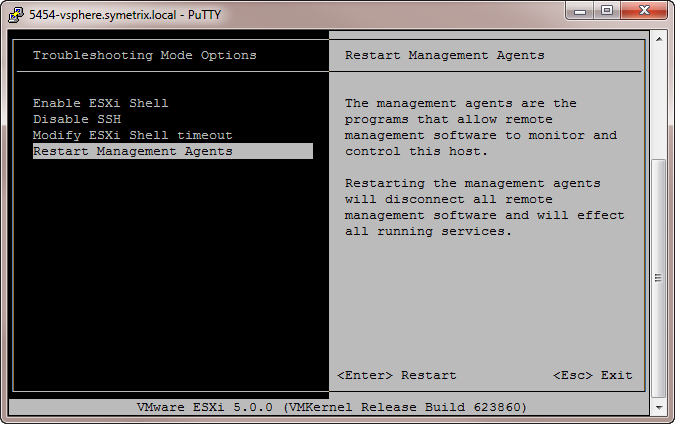
Press F11 to confirm your choice

Once the services are restarted you should now be able to login using the vSphere Client.

There have been times when I've had to restart the Management Agents multiple times before I could finally get the vSphere Client to work. I was hoping this would be resolved with VMware vSphere 5 Update 1, but unfortunately it has not. And this is only occurring for me on one vSphere server whereas we have five others that are behaving fine.
Thursday, June 21, 2012
Google Toolbar on Firefox 13
It's a shame I have to keep playing this cat-and-mouse game to keep my beloved Google Toolbar working in Firefox.
Google, if you're listening, please reconsider this decision and revive the Google Toolbar for Firefox. You provide it for Internet Explorer, what gives?
To understand the context of this post you need to read my previous post:
There I describe how you could edit a configuration file, to make the Google Toolbar work again when upgrading to Firefox 11. This trick also worked for Firefox 12. But then when Firefox 13 came along, I once again lost the Google Toolbar.
You have to first follow the steps in the previous post, but then while you have the install.rdf file open and you changed the
Change this line from this:

To this:

It worked for me, hoping this helps others as well.
Subscribe to:
Posts (Atom)